


Author: Anthony Heddings / Source: howtogeek.com
Software engineers have always developed new ways of fitting a lot of data into a small space. It was true when our hard drives were tiny, and the advent of the internet has just made it more critical. File compression plays a big part in connecting us, letting us send less data down the line so we can have faster downloads and fit more connections onto busy networks.
So How Does it Work?
To answer that question would involve explaining some very complicated math, certainly more than we can cover in this article, but you don’t need to understand precisely how it works mathematically to understand the basics.
The most popular libraries for compressing text rely on two compression algorithms, using both at the same time to achieve very high compression ratios. These two algorithms are “LZ77” and “Huffman coding.” Huffman coding is quite complicated, and we won’t be going into detail on that one here. Primarily, it uses some fancy math to assign shorter binary codes to individual letters, shrinking file sizes in the process. If you want to learn more about it, check out this article on how the code works, or this explainer by Computerphile.
LZ77, on the other hand, is relatively simple and is what we’ll be talking about here. It seeks to remove duplicate words and replace them with a smaller “key” that represents the word.
Take this short piece of text for example:

The LZ77 algorithm would look at this text, realize that it repeats “howtogeek” three times, and change it to this:

Then, when it wants to read the text back, it would replace every instance of (h) with “howtogeek,” bringing us back to the original phrase.
We call compression like this “lossless”—the data you put in is the same as the data you get out. Nothing is lost.
In reality, LZ77 doesn’t use a list of keys, but instead replaces the second and third occurrence with a link back in memory:

So now, when it gets to (h), it will look back to “howtogeek” and read that instead.
If you’re interested in a more detailed explanation, this video from Computerphile is pretty helpful.
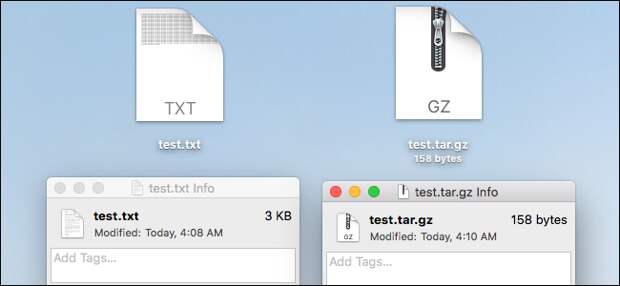
Now, this is an idealized example. In reality, most text is compressed with keys as small as just a few characters. For example, the word “the” would be compressed even when it appears in words like “there,” “their,” and “then.” With repeated text, you can get some crazy compression ratios. Take this text file with the word “howtogeek” repeated 100 times. The original text file is three kilobytes in size. When compressed, though, it only takes up 158 bytes. That’s nearly 95% compression.

Now obviously, that’s a pretty extreme example since we just had the same word repeated over and over. In general practice, you’ll probably get around 30-40% compression using a compression format like ZIP on a file that’s mostly text.
This LZ77 algorithm applies to all binary data, by the way, and not just text, though text generally is easier to compress due to how many repeated words most languages use. A language like Chinese might be a little harder to compress than English, for example.
How Does Image and Video Compression Work?

Video and audio compression works very differently….
The post How Does File Compression Work? appeared first on FeedBox.