


Author: Yuvraj Wadhwani / Source: howtogeek.com

If you deal with lots of emails, you know that the better organized you are, the easier it is to get things done. And one of the best ways to get better organized is to sort important message you want to keep into folders. Here’s how to do that in Yahoo!
Mail.Create Yahoo! Mail Folders in Your Desktop Browser
Log into your Yahoo! Mail account and open your inbox. In the navigation page on the left, click the “New Folder” button.
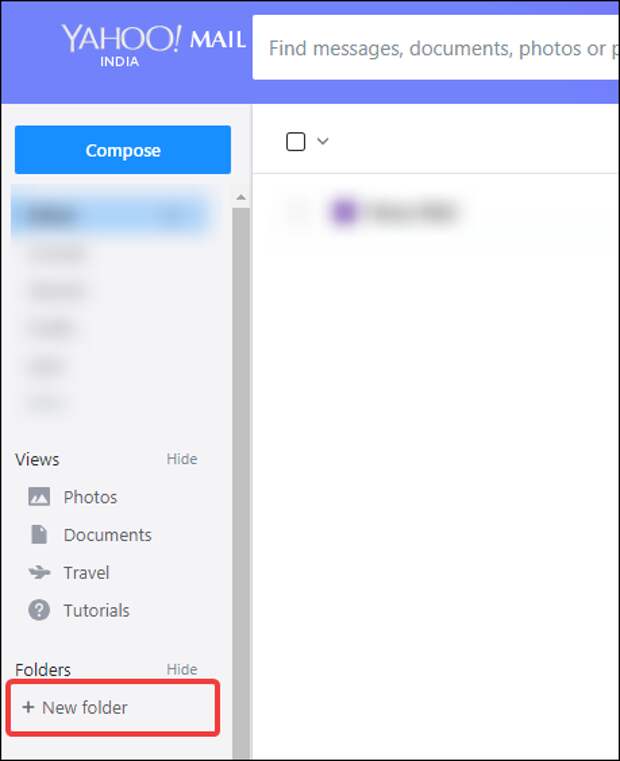
When you click the button, the button itself is replaced by a text field. Type the name for the folder you’d like to create, and then press the Enter key or the button next to the field to create the folder.
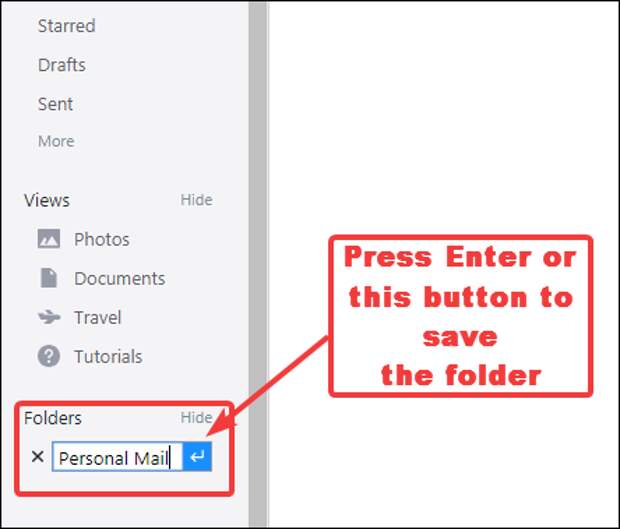
When you save the folder, you’ll see a confirmation notice pop up briefly on your screen.

Your new folder appears in the “Folders” section, right below the “New Folder” button.

If you hover your pointer over the folder name, you’ll see a button appear next to the name. Click that to see additional options for the folder.

To store messages in your new folder, you have two options. The first option is to select the messages you want to move by clicking their check boxes, then clicking the Move button, and then selecting the folder to which you want to move the messages.

You can also…
The post How to Make Yahoo! Mail Folders appeared first on FeedBox.