


Author: Cameron Summerson / Source: howtogeek.com
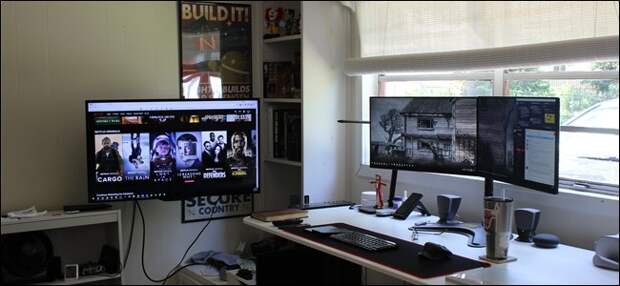
If you have a home office or specific space for your desktop PC, adding a TV to your monitor setup is a great way to add an incredible amount of versatility to your workflow (or play).
Why Would You Do This?
When it comes to getting things done, more screen is always better, right?
Well, not always—sometimes having too much screen real estate can lead to more distractions. And distractions are the antithesis of “getting things done.”That’s why having a sometimes-on, optional second (or third) display can be a godsend when you need it, and a TV is the perfect option for that. You can use it as an auxiliary display when you need it, an excellent movie-watching platform when you want it, and a great way to game on a bigger screen during your downtime. It’s a win-win-win. I recently added a TV to my computer setup, and it’s one of the most useful things I’ve ever done for exactly these reasons.
The best part is that if you pick the right TV, it will be sort of “always on”—even when it’s turned off, it’s still sipping power so your computer will still see it as turned on and connected. Why is that a big deal? Because when you disconnect a screen from your computer (even just turning it off), the GPU will reconfigure the other screens to offset the change. That is exceptionally annoying if you’re looking for a sometimes-on display.
So for that type of setup, a TV is the perfect answer.
How to Pick the Right TV
If you’re looking to add a TV to your computer setup, you don’t have to get the biggest, best, or nicest TV out there—unless you just want to, of course.
But if this isn’t going to be your “main” TV, there isn’t much reason to spend a lot of money on it. You also don’t need something as super-crisp as a good PC monitor because it’s going to be serving auxiliary duty.I’m using a 39-inch Insignia Roku TV that I picked up at Best Buy for a couple hundred bucks. If you’re looking for something similar and don’t want to deal with Best Buy, this 40-inch TCL Roku TV on Amazon is also a killer option.
There are, however, some things to consider.
Display Resolution: Keep it Modest, for Simplicity’s Sake
If you’re looking to use a TV as a second or third monitor, then display resolution is going to be crucial. While Windows has come a long way when it comes to handling ultra high resolution display,…
The post Why You Should Consider Adding a TV to Your Computer Setup appeared first on FeedBox.