


Author: Cameron Summerson / Source: howtogeek.com
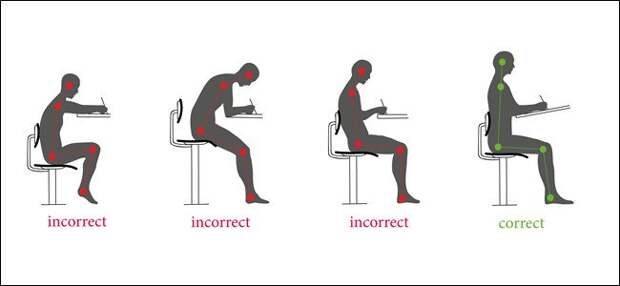
Sitting is killing you. Sitting on it’s own isn’t inherently bad, but if you work at a computer, sitting for hours every day is ultimately hard on your body. Here are some simple exercises you can do to help, though.
While sitting all the time is considered generally bad for your health, one of the first things to go is your posture.
Sitting all the time decreases core strength, which in turn makes you slouch. That’s terrible for your back, shoulders, and neck, causing pain and generally making you more unhealthy. And as you lose that core strength, the slouching gets even worse. Fortunately, this isn’t irreversible, and there are things you can start doing today to make things better.Set Your Monitor Height Correctly (and At the Proper Distance)

This may come as a shocker, but having your monitor too low is awful for your posture—yeah, we’re talking to you, full-time laptop users. The top of your monitor should be level with your eyes (when you’re sitting up straight), so you’re always looking forward and never down. With the top of the monitor at eye level, you can keep your head straight and use your eyes to see the rest of the screen.
But if you’re using a laptop, you’re probably always looking down. On a short term basis, this isn’t necessarily doing any damage. But if you’re a full time laptop user, this can be terrible for your posture—especially your neck. It can cause constant neck and back pain, headaches, and more.
So if you’re a laptop-all-the-time kind of user, we highly recommend getting an external monitor when using your laptop at a desk.
And on the subject of monitors, the distance between you and your display is also important. Generally, if you sit in your regular typing position, you should be able to stretch your hand out and just touch your monitor without stretching too much. Somewhere around 20-24 inches is pretty good. Further away and you’re not only straining your eyes, you’re more likely to incline your head forward to see well.
Image Credit: Monkey Business Images/Shutterstock.com
Uncross Your Legs

Proper posture suggests that your feet should be planted firmly on the floor—both of them. That means sitting with your legs crossed, while comfortable for some people, is ultimately hurting your posture.
So uncross those legs, plant those feet firmly on…
The post Six Tips to Help Save Yourself from Poor Computer Posture appeared first on FeedBox.